








Have you ever posted a public Snapchat Story and wondered whether someone took a screenshot of it? You’re not alone. Many Snapchat users are curious about who saves or captures their content, especially when stories are visible to a wider audience.
If you’re searching for how to see who screenshotted your public Snapchat story, the good news is that Snapchat does provide screenshot notifications in certain situations. However, there are important limitations and privacy rules you should understand.
In this guide, you’ll learn how Snapchat handles screenshots, how to identify who captured your public Story, what notifications you’ll receive, and what you can do to protect your content from unwanted screenshots.
Understanding Snapchat Story Screenshot Notifications
Snapchat has built its reputation on privacy and temporary content. One of the platform’s most notable features is its screenshot detection system.
When someone takes a screenshot of your Story, Snapchat generally notifies you by displaying a screenshot indicator next to the viewer’s name.
This feature helps users understand how others interact with their content and adds a layer of transparency that many social media platforms lack.
Does Snapchat Notify You When Someone Screenshots a Public Story?
Yes, in most cases, Snapchat notifies creators when someone screenshots their public Story.
If a viewer captures your Story using Snapchat’s built-in viewing system, you can typically see a screenshot icon beside their username in the Story viewer list.
However, Snapchat’s notification system has limitations:
- It may not detect every third-party screen recording method.
- Some external tools can bypass screenshot detection.
- Notifications depend on the app version and device compatibility.
- Deleted stories may no longer provide screenshot information.
How to See Who Screenshotted Your Public Snapchat Story
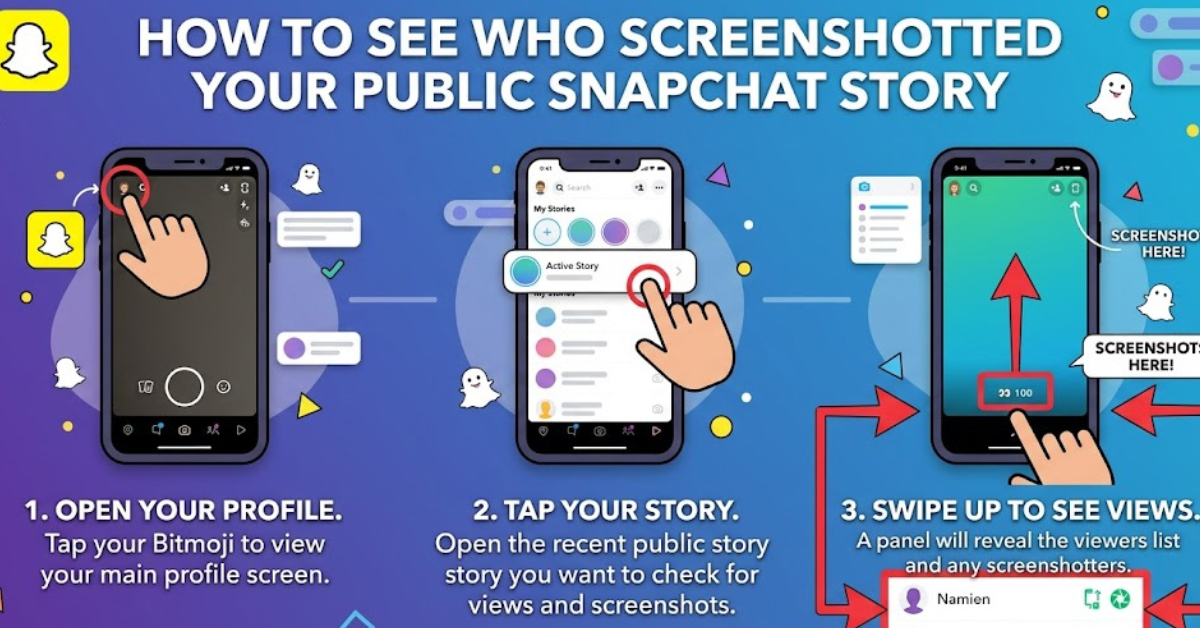
If you’re trying to find out who captured your Story, follow these steps:
Step 1: Open Snapchat
Launch the Snapchat app on your smartphone and log into your account.
Step 2: Go to Your Public Story
Tap your profile icon in the upper-left corner.
Under the “My Stories” or “Public Profiles” section, locate the Story you want to review.
Step 3: View Story Analytics
Open the Story and swipe up from the bottom of the screen.
This action reveals:
- Total views
- Viewer list
- Engagement metrics
- Screenshot activity (if available)
Step 4: Look for the Screenshot Icon
Snapchat uses a distinctive screenshot symbol next to usernames.
If someone has taken a screenshot, you’ll usually see:
Screenshot indicator
This icon helps identify which viewers captured your Story.
Step 5: Review Public Profile Insights
Creators with Public Profiles may have access to additional Story analytics, including engagement insights.
Depending on your account type, Snapchat may show:
- Total Story views
- Shares
- Reach
- Screenshot counts
These metrics can provide a broader understanding of audience interaction.
What Does the Screenshot Icon Mean?
The screenshot icon serves as a notification that a viewer saved a visual copy of your Story.
Common reasons someone might screenshot your Story include:
- Saving important information
- Keeping a memorable photo
- Sharing content later
- Referencing an event or announcement
A screenshot doesn’t automatically mean anything negative. In many cases, viewers simply find the content useful or interesting.
Public Story vs. Private Story Screenshot Notifications
Understanding the difference between public and private Stories can help manage expectations.
| Feature | Public Story | Private Story |
| Screenshot notifications | Usually visible | Usually visible |
| Audience size | Anyone eligible to view | Selected friends only |
| Viewer control | Limited | Greater control |
| Privacy level | Lower | Higher |
While Snapchat aims to notify users in both cases, private Stories offer more control over who can access your content in the first place.
Can Someone Screenshot Without You Knowing?
This is one of the most common concerns among Snapchat users.
Official Snapchat Screenshots
When someone uses their device’s standard screenshot function, Snapchat typically detects it and notifies you.
Possible Workarounds
Some users attempt methods such as:
- Using another phone to photograph the screen
- Third-party applications
- External screen capture tools
Because these methods occur outside Snapchat’s ecosystem, detection may not always be possible.
It’s important to remember that no social media platform can guarantee complete screenshot prevention.
How Snapchat Public Profiles Handle Story Engagement
Public Profiles are designed for creators, influencers, businesses, and users who want broader visibility.
These profiles often provide additional analytics, including:
Audience Insights
You may see information about:
- Story reach
- Engagement rates
- Viewer growth
- Returning viewers
Screenshot Metrics
In some cases, Snapchat includes screenshot counts within Story performance metrics, helping creators evaluate content value.
For example:
If a travel creator posts a destination guide and receives numerous screenshots, that often indicates viewers found the information useful enough to save.
Why People Screenshot Snapchat Stories
Understanding user behavior can provide context for screenshot activity.
Common reasons include:
Saving Information
Users often screenshot:
- Event details
- Addresses
- Recipes
- Product recommendations
Keeping Memories
Friends and followers may save:
- Group photos
- Celebrations
- Special announcements
Sharing with Others
Some viewers save content to discuss or share later.
Educational or Professional Reference
Public Stories sometimes contain tips, tutorials, or insights that viewers want to revisit.
Not every screenshot should be viewed as a privacy concern.
How to Protect Your Snapchat Content
Although screenshots cannot be completely prevented, you can reduce risks.
Limit Story Visibility
Review your privacy settings regularly.
Options include:
- Friends Only
- Custom audience
- Private Story lists
Avoid Sharing Sensitive Information
Never post:
- Financial details
- Passwords
- Private documents
- Confidential information
Use Private Stories for Personal Content
If a Story is intended for close friends, a private Story is usually the safer choice.
Monitor Story Analytics
Regularly checking engagement metrics can help you understand how viewers interact with your content.
Common Myths About Snapchat Screenshots
There are several misconceptions surrounding screenshot notifications.
Myth 1: Snapchat Misses Every Screenshot
False.
Snapchat detects and reports many standard screenshots.
Myth 2: Public Stories Don’t Show Screenshot Activity
False.
Public Story creators can often view screenshot indicators and related metrics.
Myth 3: Screen Recording Is Always Invisible
False.
Snapchat frequently updates detection systems and may identify some recording activities.
Myth 4: Screenshot Notifications Are Delayed for Days
Generally false.
Notifications usually appear relatively quickly after the screenshot occurs.
Key Takeaways
- Snapchat generally notifies you when someone screenshots your public Story.
- You can check screenshot activity by opening the Story and viewing the audience list.
- Screenshot icons appear next to usernames that captured your Story.
- Public Profile analytics may provide additional engagement insights.
- Some external methods may bypass Snapchat’s detection system.
- Limiting Story visibility helps improve privacy and content control.
FAQs
How do I know who screenshotted my public Snapchat Story?
Open your Story, swipe up to view the viewer list, and look for the screenshot icon next to usernames. Snapchat typically marks viewers who captured the Story.
Can I see how many people screenshotted my Snapchat Story?
Yes, many users and Public Profile creators can see screenshot counts through Story insights and engagement metrics.
Does Snapchat notify users when a public Story is screenshotted?
Yes, Snapchat generally sends screenshot notifications and displays screenshot indicators when standard screenshot methods are used.
Can someone screenshot my Snapchat Story without me knowing?
In some cases, external devices or third-party methods may avoid detection. However, standard screenshots are usually reported by Snapchat.
Are screenshot notifications available after a Story expires?
Once a Story expires, access to detailed engagement information may become limited. It’s best to review screenshot activity while the Story is still active.
Do Public Profiles show screenshot analytics?
Many Public Profiles have access to enhanced analytics, including Story performance metrics and screenshot-related engagement data.
Conclusion
Knowing how to see who screenshotted your public Snapchat story can help you better understand audience engagement and maintain greater control over your content. Snapchat’s screenshot notification system makes it possible to identify viewers who save your Stories, while Public Profile analytics provide additional insight into how your content performs.
Although no platform can completely prevent screenshots, using privacy settings wisely and sharing content thoughtfully can significantly reduce concerns. Keep an eye on your Story analytics, review screenshot indicators regularly, and make informed decisions about what you post publicly on Snapchat.