








Have you ever opened TikTok and wondered whether other users can see that you viewed their profile? With TikTok’s Profile View History feature, your visits can become visible to certain users. If you prefer browsing privately, knowing how to turn off profile views on TikTok is an essential privacy setting to understand.
In this guide, you’ll learn exactly how to disable profile views, what happens after turning the feature off, why TikTok offers this option, and how to control your account privacy more effectively.
What Are TikTok Profile Views?
TikTok Profile View History is a feature that allows users to see who has visited their profile within the past 30 days. However, there is a catch: both users must have Profile View History enabled to see each other’s visits.
For example, if you visit someone’s profile and both of you have the feature turned on, your username may appear in their profile viewers list. If you disable it, your future profile visits will no longer be shared through this feature.
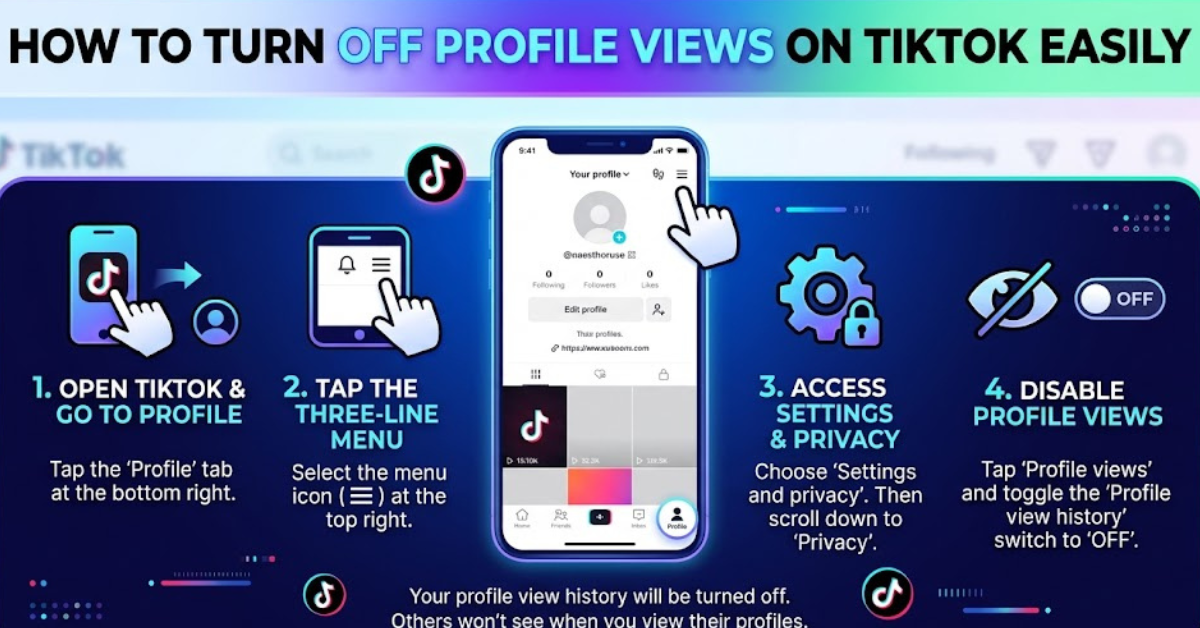
How to Turn Off Profile Views on TikTok (Step-by-Step)
Disabling Profile View History takes less than a minute. Follow these simple instructions:
- Open the TikTok app on your smartphone.
- Tap the Profile icon in the bottom-right corner.
- Tap the three-line menu (☰) in the top-right corner.
- Select Settings and privacy.
- Tap Privacy.
- Choose Profile views.
- Turn off the toggle next to Profile View History.
Once the switch is disabled, your profile visits will no longer appear to other users who have this feature enabled.
Another Way to Disable TikTok Profile Views
TikTok sometimes displays a footprint icon near the top of your profile page. You can also manage your settings from there.
Using the Profile Views Icon
- Open TikTok and go to your profile.
- Tap the footprint icon in the top-right corner.
- Select the settings option.
- Turn off Profile View History.
This shortcut is useful if you frequently adjust your privacy settings.
What Happens After You Turn Off Profile Views on TikTok?
Many users worry that turning this setting off will affect their account visibility or engagement. In reality, it only changes profile viewing information.
After disabling Profile View History:
- Other users cannot see that you visited their profile.
- You can no longer see who visited your profile.
- Your TikTok videos, likes, comments, and followers remain unaffected.
- You can turn the feature back on whenever you want.
It creates a more private browsing experience without limiting your ability to use TikTok.
Why You Might Want to Turn Off Profile View History
People choose to disable this feature for many reasons.
More Privacy While Browsing
You may want to look at a creator’s profile, check a friend’s account, or explore other users without notifying them.
Avoid Unwanted Attention
Some users feel uncomfortable knowing others can track their profile visits. Turning the feature off helps maintain more control over your online activity.
A More Relaxed TikTok Experience
Social media should feel enjoyable. Removing profile tracking can make browsing feel more natural and less stressful.
Why Can’t I Find the Profile Views Option on TikTok?
If you cannot locate the setting, several factors may be involved.
Your TikTok App Needs Updating
Older versions of TikTok may not display the latest privacy settings. Update the app from your device’s app store and check again.
Feature Availability Varies
TikTok may limit certain features based on account eligibility, region, or testing phases. Not every user sees the same settings at all times.
Account Requirements
Profile View History is generally available only to users who meet TikTok’s eligibility requirements, such as being within certain age limits and having a limited number of followers.
Does Turning Off Profile Views Delete Previous History?
Turning off the feature prevents future profile visits from appearing to others. However, profile view records that were already visible before you disabled the setting may not disappear immediately, depending on how TikTok manages its history data.
If privacy is important to you, disabling the setting as early as possible is the best approach.
Additional TikTok Privacy Tips
Profile views are just one part of your TikTok privacy settings. You can improve your account security by:
- Making your account private.
- Controlling who can comment on your videos.
- Limiting who can send you direct messages.
- Managing your liked videos visibility.
- Blocking users who make you uncomfortable.
- Reviewing your TikTok privacy settings regularly.
Taking a few minutes to customize these options can create a safer and more personalized experience.
Quick Takeaways
- TikTok Profile View History shows who visited your profile within the last 30 days.
- You can disable it through Settings and privacy > Privacy > Profile views.
- Turning it off prevents others from seeing your profile visits.
- You also lose the ability to see who viewed your profile.
- Your videos, followers, and account performance are not affected.
Frequently Asked Questions
How do I turn off profile views on TikTok without anyone knowing?
Go to Settings and privacy, open Privacy, choose Profile views, and disable Profile View History. Other users are not notified when you turn this setting off.
Can people still see my profile if I turn off profile views?
Yes. Disabling profile views only hides your profile visit history. Your account, videos, and public content can still be viewed according to your privacy settings.
Why did TikTok remove my profile views option?
The option may be unavailable due to your app version, account eligibility, age restrictions, or TikTok testing different features in your region.
Can I see who viewed my TikTok profile after turning off Profile View History?
No. The feature works both ways. Once disabled, you cannot see your own profile visitors.
Does turning off profile views affect followers or likes?
No. It has no impact on your followers, video reach, likes, comments, or TikTok recommendations.
Can I turn Profile View History back on later?
Yes. You can return to the Profile views settings and enable the feature whenever you want.
Conclusion
Understanding how to turn off profile views on TikTok gives you greater control over your privacy while using the platform. The process is quick, simple, and does not affect your content, followers, or engagement.
Whether you want to browse anonymously or simply reduce your digital footprint, adjusting your Profile View History settings can make TikTok feel more comfortable and private. Take a moment to review your privacy controls and customize the app in a way that works best for you.