







Have you ever sat down to file your taxes only to realize your W-2 is nowhere to be found? You’re not alone. Every year, millions of workers scramble to locate tax documents they need for filing returns, applying for loans, or verifying income.
If you’re asking, “how can I get a copy of my W2 online?”, the good news is that there are several ways to access it quickly. Depending on your employer, payroll provider, and tax situation, you may be able to download a digital copy in minutes.
This guide explains where to find your W-2 online, what to do if you can’t access it, and the fastest solutions available.
What Is a W-2 Form?
A W-2, officially called the Wage and Tax Statement, is a tax document employers provide to employees each year.
It reports:
- Total wages earned
- Federal income tax withheld
- State and local tax withholdings
- Social Security wages and taxes
- Medicare wages and taxes
- Retirement plan contributions
You’ll typically need your W-2 to file your federal and state income tax returns accurately.
Can You Get a Copy of Your W-2 Online?
Yes, in many cases you can.
Many employers and payroll companies now provide electronic access to tax documents through employee self-service portals. If your employer participates in digital payroll systems, you may be able to view and download your W-2 immediately.
Common sources include:
- Employer HR portals
- Payroll platforms
- Tax preparation software
- Government records (in some circumstances)
The method that works best depends on where your W-2 was originally issued.
Check Your Employer’s Employee Portal
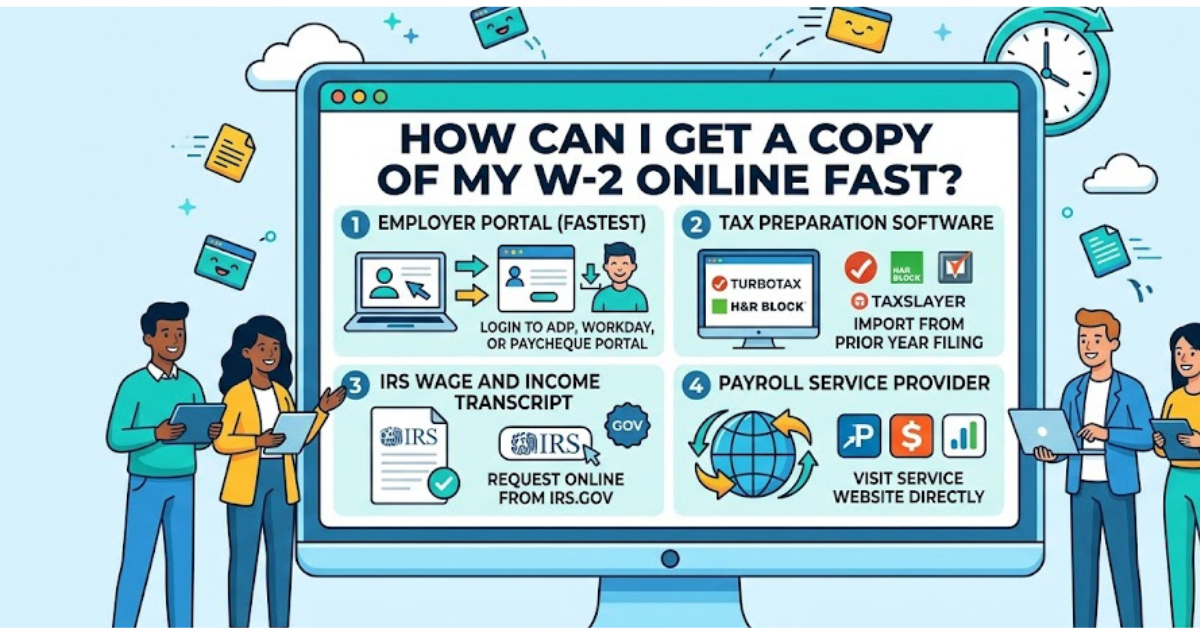
The fastest answer to how can I get a copy of my W2 online is often through your employer’s online portal.
Many businesses use HR and payroll systems that allow employees to access tax forms at any time.
Information You May Need
To log in, you’ll typically need:
- Employee ID number
- Username and password
- Email verification
- Multi-factor authentication
What to Do
- Visit your employer’s employee portal.
- Log in to your account.
- Navigate to “Payroll,” “Tax Documents,” or “W-2 Forms.”
- Select the tax year you need.
- Download or print the form.
If you no longer work for the company, you may still have access to a former employee portal.
Access Your W-2 Through Payroll Providers
Many companies outsource payroll processing to third-party providers.
Popular payroll companies include:
- ADP
- Paychex
- Gusto
- Paycom
- Workday
- UKG (Ultimate Kronos Group)
- Ceridian Dayforce
How Payroll Portals Work
If your employer uses one of these systems, your W-2 may be available directly through the provider’s employee dashboard.
Generally, you’ll need:
- Registration information
- Employer code
- Social Security Number
- Personal verification details
Once verified, you can often download current and previous years’ W-2 forms.
Ask Your Employer for a Digital Copy
If you can’t access an online portal, contact your employer directly.
Reach Out to:
- Human Resources department
- Payroll department
- Accounting office
- Former employer’s HR team
Most employers keep payroll records for several years and can usually provide:
- A replacement paper copy
- A secure PDF version
- Access instructions for an online portal
Many employers can email instructions within a few business days.
Can You Get a W-2 From the IRS?
Yes, but there are limitations.
The IRS maintains wage and income information reported by employers. However, obtaining a complete copy isn’t always immediate.
Wage and Income Transcript
You may request a Wage and Income Transcript containing information from:
- W-2 forms
- 1099 forms
- 1098 forms
- Other reported income records
The transcript includes most information from your W-2 but does not always contain the exact state tax details shown on the original form.
When This Option Helps
A transcript can be useful when:
- You’ve lost your W-2
- Your employer has closed
- You need income verification
- You’re preparing a prior-year tax return
Get a Copy From Your Tax Preparation Software
Many taxpayers overlook this option.
If you used tax software in previous years, your W-2 information may already be stored within your account.
Examples include:
- TurboTax
- H&R Block software
- TaxAct
- Cash App Taxes
- FreeTaxUSA
Benefits
You may be able to:
- View imported W-2 data
- Download prior tax returns
- Access tax documents from earlier years
Keep in mind that some platforms store tax return information rather than the actual W-2 document itself.
What If You Never Received Your W-2?
Employers are generally required to provide W-2 forms by the end of January.
If you haven’t received yours:
Step 1: Verify Your Address
Confirm that your employer has your current mailing address.
Step 2: Contact Payroll
Ask whether the form was mailed or posted online.
Step 3: Request a Replacement
Most employers can issue another copy.
Step 4: Use Alternative Documentation
If filing deadlines are approaching, pay stubs and payroll records may help estimate earnings until the official form arrives.
How Far Back Can You Get Old W-2 Forms?
The availability depends on the source.
| Source | Typical Availability |
| Employer | Several years |
| Payroll Provider | Varies by provider |
| Tax Software | Depends on account history |
| IRS Records | Multiple prior years |
If you need a W-2 from many years ago, contacting the employer and reviewing IRS records are often the best approaches.
Common Problems When Accessing W-2 Forms Online
Forgotten Login Credentials
Use password recovery tools or contact customer support.
Former Employee Access Disabled
Request reactivation or a direct copy from HR.
Employer No Longer Exists
Check IRS wage transcripts or contact the payroll provider that handled employee records.
Incorrect Information on the W-2
Notify your employer immediately and request a corrected W-2 (Form W-2c).
Tips for Keeping Future W-2 Forms Accessible
To avoid future headaches:
- Save digital copies annually
- Store tax records securely
- Enable paperless tax document delivery
- Update contact information with employers
- Keep payroll portal login details in a password manager
These simple habits can save hours of searching during tax season.
Key Takeaways
- The easiest way to get a W-2 online is through your employer’s HR or payroll portal.
- Payroll providers like ADP, Paychex, and Workday often offer downloadable W-2 access.
- Former employees can usually request copies from HR departments.
- Tax software may store W-2 information from prior returns.
- IRS wage and income transcripts can help when original forms are unavailable.
Frequently Asked Questions
How can I get a copy of my W2 online if I no longer work for the company?
Contact the former employer’s HR or payroll department. Many companies maintain online access for former employees or can provide a replacement copy upon request.
Can I download my W-2 directly from the IRS?
The IRS generally provides wage and income transcripts rather than downloadable original W-2 forms. These transcripts contain much of the same information.
How do I find out which payroll company my employer uses?
Check old pay stubs, employee emails, onboarding documents, or ask your HR department. Payroll provider information is often listed on pay statements.
Can I get previous years’ W-2 forms online?
Yes. Employers, payroll providers, tax software platforms, and IRS records may all provide access to prior-year wage information.
What should I do if my W-2 contains incorrect information?
Contact your employer immediately and request a corrected W-2, known as Form W-2c. Do not file your taxes using inaccurate information if corrections are needed.
Is it safe to access my W-2 online?
Yes, provided you use secure employer or payroll websites. Always enable multi-factor authentication and avoid accessing tax records on public Wi-Fi networks.
Conclusion
If you’re wondering how can I get a copy of my W2 online, the process is usually simpler than many people expect. Your employer’s HR portal, payroll provider, or tax software account often provides the fastest solution. Even if you’ve lost access or changed jobs, there are still reliable ways to obtain the information you need.
Start by checking your employer’s online system, then explore payroll records or tax software accounts if necessary. With the right approach, you can quickly retrieve your W-2 and move forward with filing taxes, verifying income, or managing important financial tasks.